

Updated Dec 26, 2024
Transform your maps into dynamic, visually engaging experiences with Mapme’s 3D building feature. Whether you want to showcase an entire cityscape or highlight specific landmarks, 3D buildings make your maps more immersive and impactful.
Why Add 3D Buildings to Your Maps?
- Create stunning visuals: Captivate and engage viewers with realistic map displays.
- Highlight key locations: Make important buildings stand out effortlessly.
- Enhance spatial clarity: Provide users with a better understanding of the surrounding environment.
Mapme’s 3D building feature is optimized for efficiency, ensuring fast loading times and smooth performance even on low-power devices. To maintain speed, details like windows and textures are omitted, keeping the experience seamless and visually appealing.
What Buildings Are Available in 3D?
Mapme uses data from OpenStreetMap to display 3D buildings. This global, community-driven platform provides extensive coverage, with urban areas typically having more detailed data than rural ones. Depending on the contributions, buildings may vary from basic shapes to intricate designs.
How to Add Missing 3D Buildings
If a building is missing, you can add it in two ways:
- Use Mapme’s drawing tools: Draw shapes and convert 2D drawings into 3D buildings using extrusion.
- Contribute to OpenStreetMap: Add or enrich building data using OpenStreetMap editors, such as the iD editor, which is user-friendly and requires no installation. Check our video tutorial
How Long Do Updates Take to Appear?
Changes made to OpenStreetMap typically appear on Mapme maps within a few days. If your updates don’t show up after this time, contact our support team for assistance.
Examples of 3D Building Use Cases
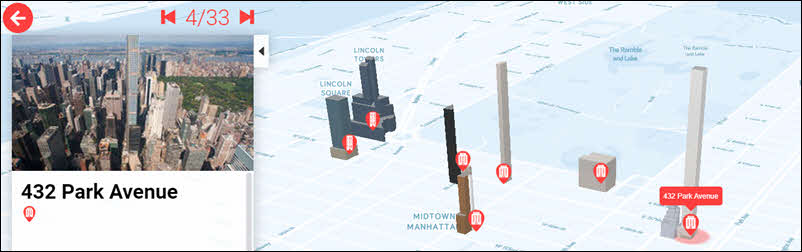
Real Estate Development
Showcase new developments within existing urban contexts, highlighting building heights, shadows, and views. See example.
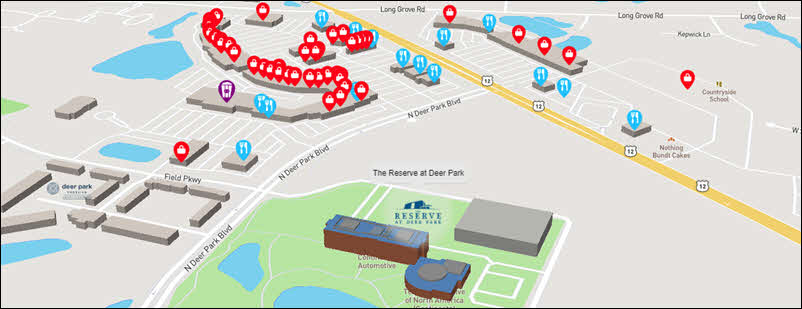
Neighborhood Guides
Highlight amenities near properties for sale or lease, providing a comprehensive view for potential customers. See example.
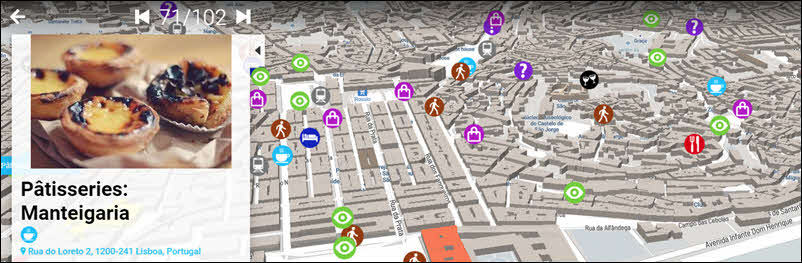
City Guides
Help users navigate cities with maps featuring 3D points of interest. See example.
Best Practices for Displaying 3D Buildings
- Use a 40-60 degree tilt for optimal viewing angles.
- In dense urban areas, display only relevant buildings for clarity.
For detailed guidance, learn more here.
Frequently Asked Questions
Do 3D buildings affect map performance?
When following best practices, 3D buildings have minimal impact on performance, as they load selectively based on zoom levels.
Should I add a missing building in Mapme or OpenStreetMap?
For immediate results, use Mapme’s tools. To make data globally accessible, contribute to OpenStreetMap.
How accurate are 3D building heights in digital maps?
Accuracy varies by data source and region. OpenStreetMap data is generally reliable in urban areas, with building heights accurate within 1-2 meters.
What is the best angle to display 3D buildings?
A 40-60 degree pitch provides the best depth and clarity.
Do I need technical skills to add buildings to OpenStreetMap?
No, anyone can contribute to OpenStreetMap with basic guidance.
Get Started with 3D Buildings Today
Enhance your maps with 3D buildings and elevate your storytelling. If you need help, contact our support team